
Categorie

Archivio Articoli

Categorie

Commenti recenti

[Linux] Change virtual screen size in xorg.conf

Linux


If when you try to set a dual monitor with xrandr obtain the message:

$ xrandr: screen cannot be larger than widthXheight (desired size mywidthXmyheight)

You can solve creating a new file in:

$ /usr/share/X11/xorg.conf.d/

e.g.:

$ sudo nano /usr/share/X11/xorg.conf.d/50-default-screen.conf

With the following content:

Section "Screen"
     Identifier      "Default Screen"
     SubSection "Display"
            Virtual         4096 4096
     EndSubSection
EndSection


Then restarting the session!
Enjoy.

[git] Vademecum

logo-git


In software development, Git /ɡɪt/ is a distributed version control and source code management (SCM) system with an emphasis on speed. Initially designed and developed by Linus Torvalds for Linux kernel development in 2005, Git is reported to have 30% market adoption as of 2013.
[wikipedia.org]


# Retrieve a project

git clone <git-location> <folder-name>

# Update a project

git pull

# Adding a file

git add <filename>

# Commit

git commit -a -m 'Description'

# Upload modified project

git push

[Linux] Impostare l’overscan con i driver AMD Catalyst da terminale

ati-catalyst-linux-logo


Se si è installato i driver proprietari AMD Catalyst e si ha uno schermo con collegamento HDMI può succedere che ad ogni riavvio si riazzeri l'impostazione dell'overscan.

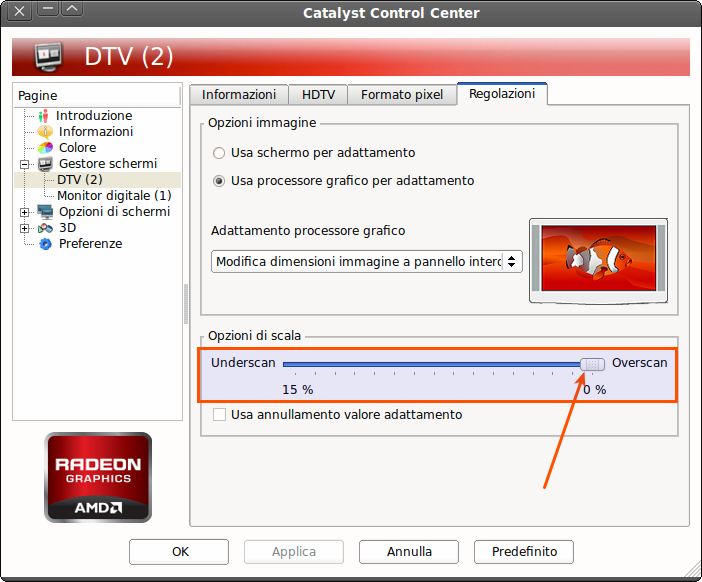
Per riportare l'overscan all'impostazione salvata è necessario avviare  l'AMD Catalyst Control Center (come amministratore) e muovere leggermente lo slider dell'overscan.

Catalyst Control Center


Ecco qui un utile comando da terminale per evitare questa noiosa procedura:

sudo amdconfig --set-pcs-val=MCIL,DigitalHDTVDefaultUnderscan,0

Quindi procedere al riavvio per verificare il corretto funzionamento.

Fonte: http://askubuntu.com/questions/166937/amd-radeons-overscan-is-reset-after-every-boot

Logo: http://mygeekopinions.blogspot.it/2011/06/how-to-install-atiamd-catalyst-linux.html